


Electrical · Mechanical · Plumbing · Drywall · Concrete · Framing · Painting
Run your scope — not the GC's software.
AdvantaBuild is project management built for specialty subcontractors. Daily logs with crew hours, RFIs, submittals, punch lists, job costing, change orders, contracts, vendor POs and bills, progress billing, look-ahead schedules and drawing markup — a fraction the size of Procore, and built for how your crews actually work.
21 days free, no credit card. Invite a foreman and log your first day today.
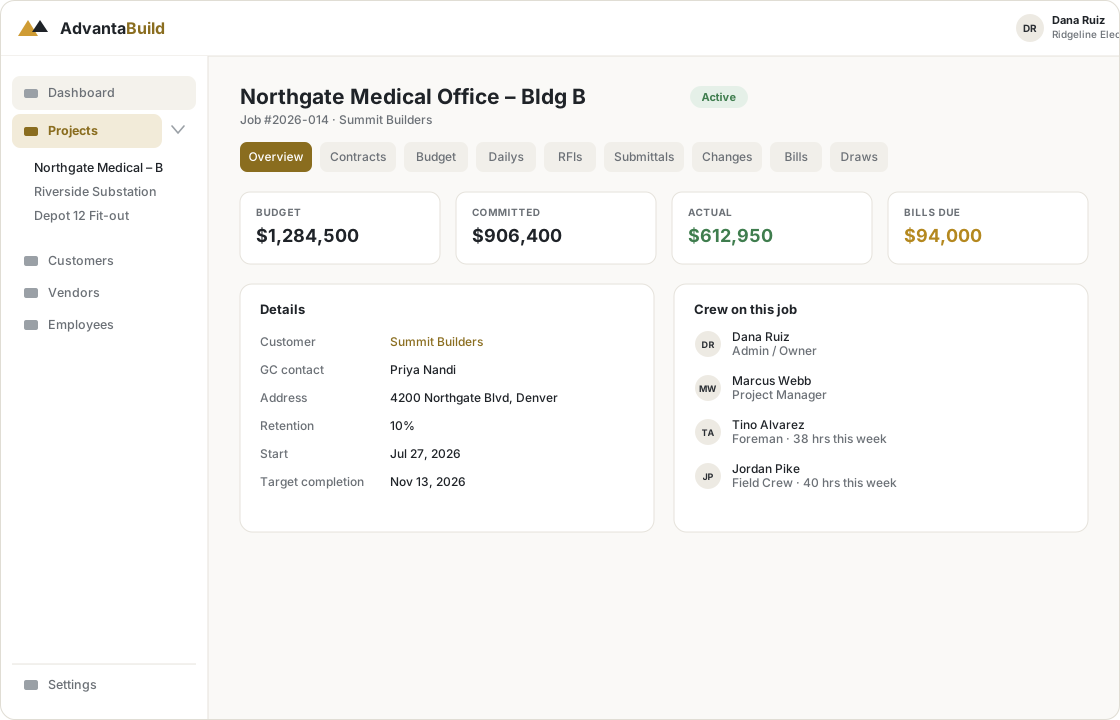
Not a scaled-down GC tool
A sub's world is different: you manage your own crews and your own money while reporting up to a GC. AdvantaBuild is built around that reality.
You work inside someone else's project
AdvantaBuild isn't trying to replace the GC's Procore. It's your shop's tool, with light touchpoints for GC paperwork.
Your scope, your crews, your money
Track status and costs the way a sub does — not a scaled-down general-contractor product with 200 settings.
One obvious path per screen
Big tap targets, camera front and centre, gloves-on usable. Smart defaults instead of a wall of toggles.
Everything a sub needs. Very little you don't.
Fourteen modules covering the whole loop — field, office, the money in and out, and the GC paperwork in between. When in doubt, we cut a feature instead of adding a toggle.
Daily logs
One log per crew per day — weather, crew + hours, work performed, delays, photos. Under two minutes on a phone.
RFIs
Draft → sent to GC → answered → closed. Four states, no ceremony. Log the GC's response and attach the drawing.
Punch list
Location, photo, assignee, due date. Field closes an item with a proof photo in a couple of taps.
Budget & job costing
Cost codes per project, budgeted vs. committed vs. actual, live variance. Numbers a PM can trust — no ERP.
Look-ahead schedule
A rolling 2–3 week look-ahead as the main view, because that's how subs plan crews. Flag slips that hit billing.
Drawings
Version history that actually works — upload a new rev, old ones stay, clearly marked superseded. Search that finds it.
Change orders
Price the extra work, send it to the GC, log the decision. Approved COs roll into a revised budget automatically — your original numbers stay intact.
Progress billing
Build a schedule of values from the budget, bill by percent-complete with retention held back, and hand the GC a clean printable pay application.
Submittals
Product data, shop drawings and samples through the same tight loop as RFIs — draft, sent, GC response logged, closed. Ball-in-court always visible.
Drawing markup
Redline the current sheet right in the browser — numbered pins, notes and freehand over images and PDFs. Markups ride along with the revision.
Contracts
Your subcontract, POs and exhibits filed against the job — value, retention, executed date, status, and the signed PDF attached.
Bills & purchase orders
Turn a vendor quote into a PO, record bills against it, and watch it flow straight into the budget's committed and actual by cost code.
Customers & vendors
One shared directory of the GCs you work for and the suppliers you buy from. Every project is tied to a customer.
Crew & labor hours
An employee roster, and every daily log records who was on site and their hours — so man-hours land on the right job and cost code.
Already keeping your books in QuickBooks? Bring it into AdvantaBuild.
No re-typing vendors, customers, or jobs. Connect your QuickBooks Online company once, then import exactly what you want, when you want it — Standard plan and up.
You choose what comes in
Connect your QuickBooks company, then pick exactly which vendors, customers, and jobs to bring in from a simple checklist. Nothing copies over automatically.
Bills sync themselves
Once a bill's vendor and job are both imported, its bills keep flowing in on their own — no re-entering invoices by hand.
One-way, always
AdvantaBuild only pulls from QuickBooks — it never writes back. Your books stay exactly as your bookkeeper left them.
AI agents that draft the paperwork, so your crew doesn't have to
Built on Claude, grounded in your project's own drawings, specs and logs. Nothing sends or saves on its own — every agent drops a draft into the form you already use, for a human to review.
Ask
Ask a plain-English question about the job and get a cited answer pulled from your drawings, specs, RFIs, submittals, daily logs and budget — with links straight to the source.
Daily log assist
Dictate the day instead of typing it. Drafts the work-performed narrative and fills in the crew and hours from your roster — you review before it's submitted.
RFI draft
Describe the issue in a sentence and attach a photo. Get a subject, question and suggested drawing references drafted for you to edit and send.
Built for the field
Office staff get desktop-grade budgets and scheduling. Foremen and crew leads get a phone-first app that works outdoors, on a job site, with gloves on.
- Daily log, RFI or punch item in 2–3 taps from the home screen
- Camera-first photo capture on every field workflow
- "What needs my attention today" home screen — not a menu tree
- Four roles — Admin, PM, Foreman, Field Crew — each sees only what they need. No permissions matrix.
The core loop
- 1Add the customer, create the project, set your cost codes
- 2Log the subcontract; issue vendor POs from their quotes
- 3Foreman submits a daily log — crew, hours, photos — from their phone
- 4Raise an RFI or submittal, track it to a GC response, close it
- 5Price a change order and watch the budget revise itself
- 6Enter vendor bills; committed and actual roll up by cost code
- 7Bill the GC by percent-complete and print the pay app
- 8Watch budget vs. actual and the 2-week look-ahead
Every trade, every kind of job site
Sitework, concrete, framing, deliveries — the crews doing the work look different every day. AdvantaBuild works with whatever trade you are.




Simple pricing. Your field crew is always free.
Priced for the people who own budgets and send paperwork to the GC — not per person on your crew. Every plan gets the full product; higher tiers add more office seats and the integrations a growing shop needs.
Standard
$449/mo
- 8 office seats
- Unlimited projects
- Everything + QuickBooks/Sage export
Self-serve
Pro
$849/mo
- 20 office seats
- Unlimited projects
- + SSO, divisions, priority support
Sales-assist
Field crew seats are unlimited and free on every plan. Annual billing saves ~2 months. Extra office seats beyond your plan: ~$35/seat/mo.
AI agents add-on
Ask, Daily log assist, and RFI draft — on any plan.
+$299/mo
Coming soonReady to ditch the spreadsheets?
Register your company in a minute — 21 days free, no credit card. You'll be the account owner.
Also from Tanstone Technologies
Ready to price your next job?
AdvantaBid is bid and estimating software for subcontractors, from the makers of AdvantaBuild. Price the job in AdvantaBid, then run it here.